Category: Heath Way Prints

  • Baaa Humbug!

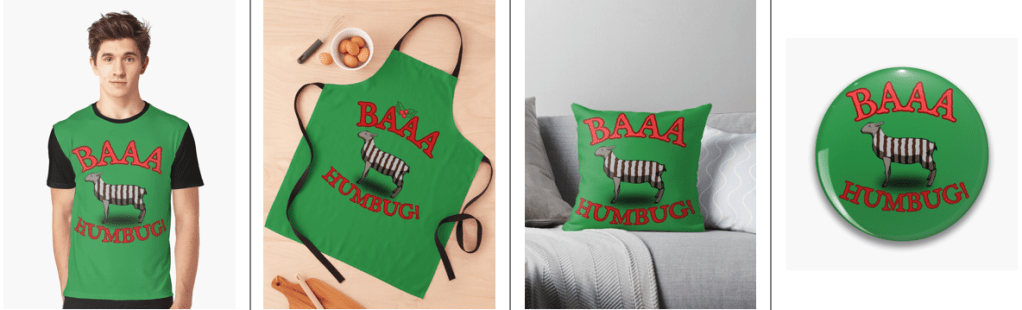
    Baaa Humbug!

    A Heath Way Prints design.

    The ‘Baaa Humbug!’ design on a t-shirt, apron (with holly), cushion and pin badge.

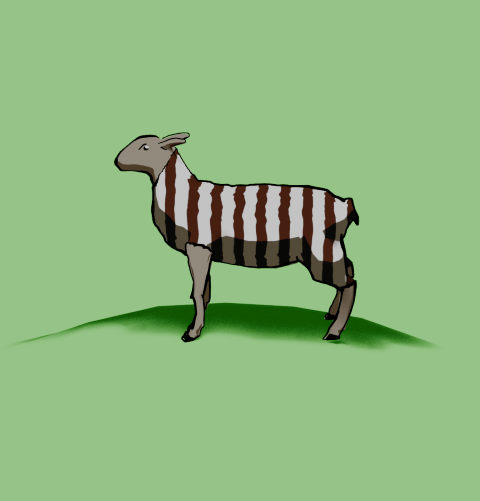
    This was an idea from Mrs S – a sheep with a humbug1 body.

    Sheep building

    The modelling of the sheep was the main challenge here. I decided to go for a ‘low poly’ design, similar to the fearsome dinosaur I made as part of the course I did in March ’25.

    Returning to the University of YouTube, I followed a video by Ryan King, who is a reliable tutor and another one who doesn’t skip the fiddly bits. He made a duck, a shark and a dog in this tutorial, the dog was the best one to follow for the sheep, what with having four legs and all.

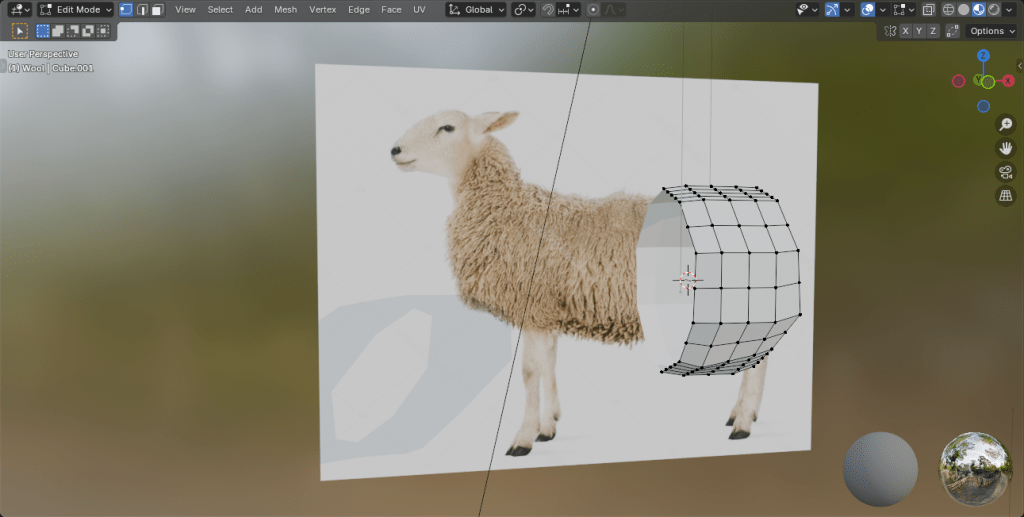
    Making a low poly sheep is an exercise in making a tube and shaping it to match a sheep (I used a photo of a sheep as a guide) and then adding legs and ears.

    The start of the sheep construction process. Using a side-on view of a sheep, a tube is extended and squidged to make a sheepish body. Legs are added by extruding from the sides.

    Shading

    The shading was the complex bit. I wanted to have a cartoon look to the sheep because that’s an aesthetic I like and also makes the final print a bit clearer.

    I’ve done quite a lot of cartoon shading over the last couple of months, the tricky part was getting more than one colour onto a cartoon.

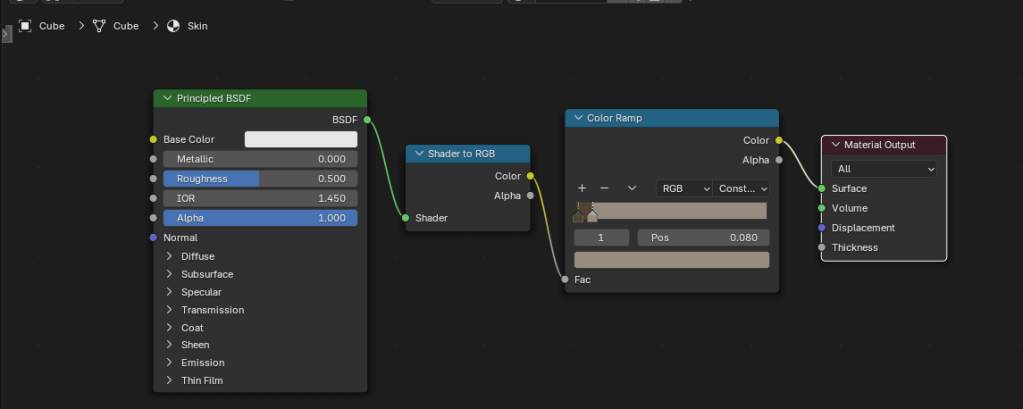
    The basic cartoon shader. It converts the original colour to RGB (not sure why), then the colour ramp restricts the colours to two shades, dark and light. This gives a cartoon shading effect that I’ve grown fond of.

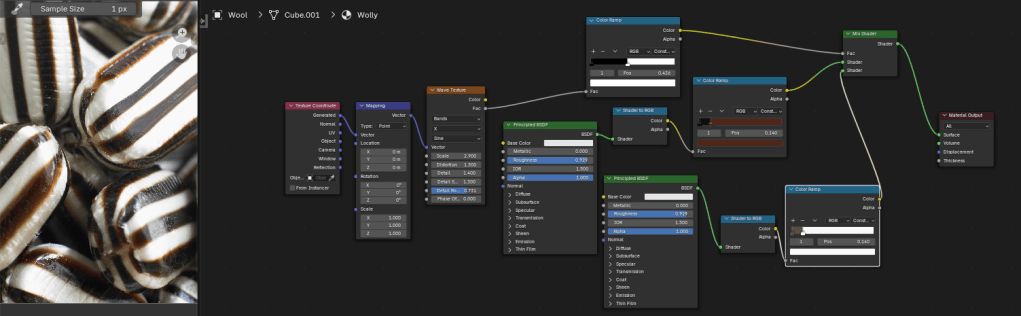
    Doing one colour is easy enough, it’s two shader nodes. Adding a striped pattern and getting the stripes to mimic a humbug was a bit of a thinker. In the end, I found a way of doing it using various shader nodes.

    The humbug shader. I used a photo of humbugs to get the right colours. This is a bit more complex than the single shader, since the system needs to be told where to put the brown and white colours.

    So we can go from a plain white or brown sheep to a striped sheep. Then we need to add outlines.

    From left to right, a plain white coat, a brown coat (colour for the humbug stripes), stripes added and then with outline and frown drawn in.

    Outlines

    I’d previously used the system’s grease pencil to add lines to cartoons and it works well. For the cartoon mech, I just thickened the lines a bit but otherwise didn’t adjust the grease pencil added by Blender.

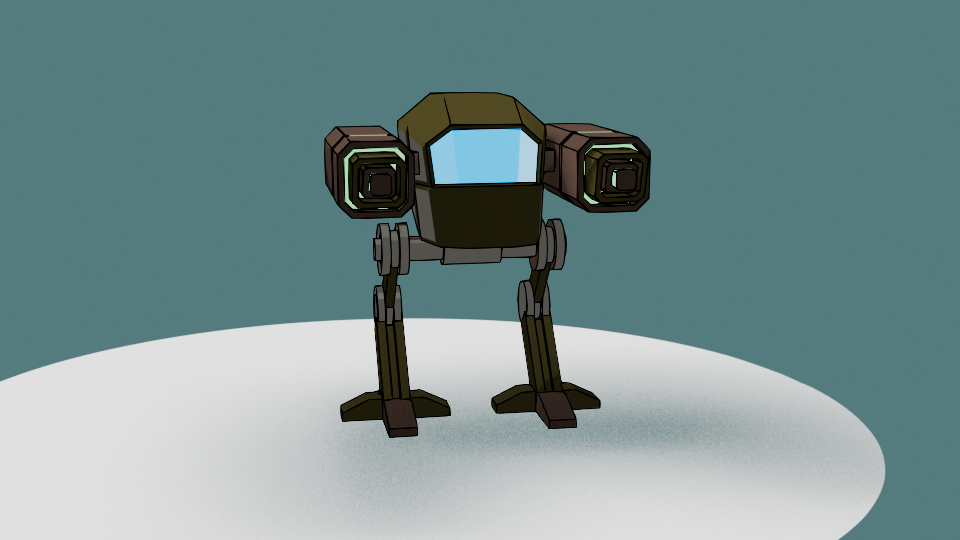
    Another variation of the two legged mech I made a few months ago. This cartoon version has ‘scene line art’ added, automatically adding lines to the model.

    Well, most of the time it works well. But this time it didn’t, adding lines where I didn’t want them and missing out other lines. So I had to draw the lines myself. I’m part way through an 2D animation course so I had learned about adding lines and editing them already. I applied this new knowledge to the sheep, using a drawing tablet I bought a few months ago. This meant I actually learned how to use it.

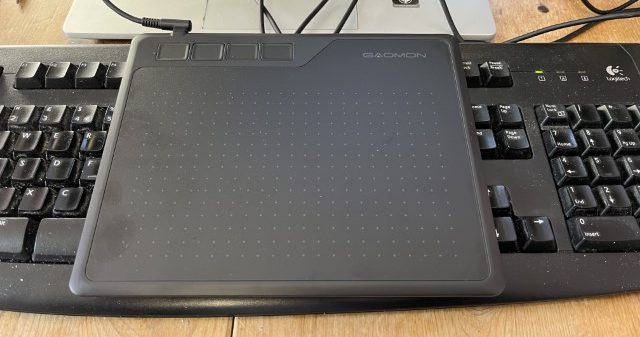
    My graphics tablet. This one cost £24, the ones professionals use can be in the hundreds of pounds, even over a grand. I’ve also just noticed that there are thumbprints on the left side where I hold it.

    Once I’d drawn the lines I was able to adjust them. Because I’m not much of an artist and I’m not used to the graphics tablet, the lines weren’t perfect. However, because they are digital, the lines are editable, so I could move and stretch them until I was happy with the look. This is similar to the way I sculpted the virtual clay to make Bob the demon and Steve the orc. I didn’t want it to be too perfect, just believably hand-drawn.

    Somehow, I managed to get the sheep looking really grumpy as well. A fortunate accident with the line I drew for the eye ridge.

    Final design

    I exported the final sheep into Canva to add the background and lettering. The font is IM Fell English, based on an 18th century script and so perfect for an olde worlde feel.

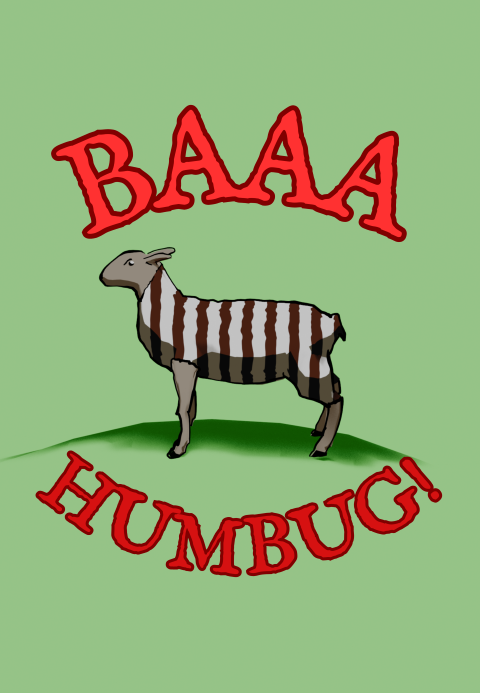
    One version of the “baa humbug” design.

    Because I’m using RedBubble rather than Etsy, I can offer the design on a variety of things. In RedBubble I can also specify the background colour to be used in the designs; I can do that in Canva, too, but the shape of the different products means that sometimes there can be white space at the sides or the design looks too small on the product.

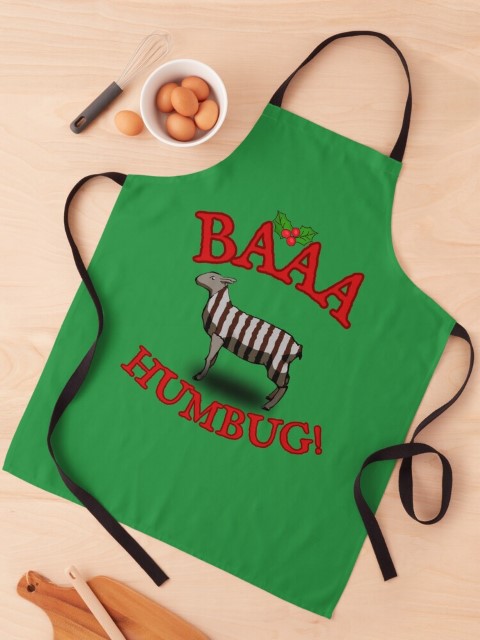
    Baaa humbug design on an apron.

    At the suggestion of Mrs S, I added a sprig of holly to the design that goes on the apron. Not sure why, but it works for the apron but not for the other items such as t shirt and cards.

    1. Humbugs are striped, mint-flavoured sweets. ↩︎
  • Game over!

    Game over!

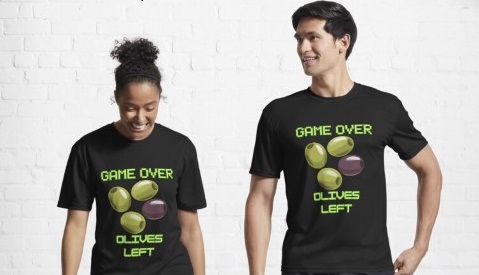
    Heath Way Prints design.

    This was a cryptic crossword clue I thought of some time ago, and realised recently it would make a good t shirt/ mug/ mouse pad etc.

    Canva design

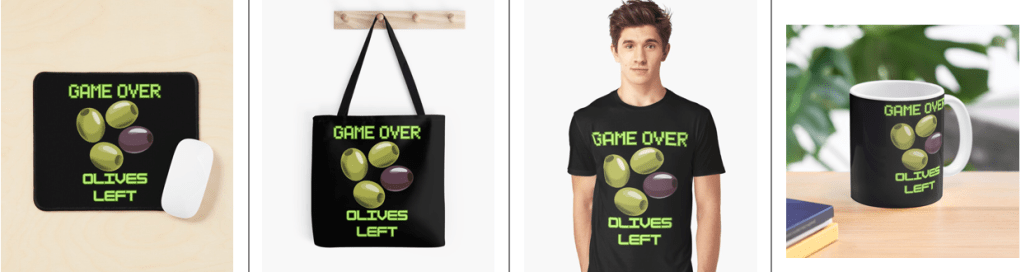
    I think it took me about 20 minutes to do this, all in Canva. Deciding on the fonts to use was the tricky part. What I really wanted for the ‘Game Over’ part was the sort of font used in Rollerball1 and throughout the 1970s to indicate that a computer was involved. There is a font called Rollerball, though Westminster is also available for Word, but I couldn’t work out how to get that in to Canva. So I used Retropix for the Game over, and HK Modular for the Olives left. A nice neon green, reminiscent of the old green screens I spent my early computer years staring at completed the text design.

    Example text for the Westminster font.

    The olives were taken from a Canva catalogue of designs. There were plenty of olive designs to choose from, the three green and one black in a cartoon style was the best, and similar to what I might have designed myself.

    Once I was happy with the design I downloaded it from Canva then uploaded it to RedBubble. Making sure the design looked right on all the products and writing the description and keywords still takes me some time, but I hope I’m getting better at this.

    I finished a social media marketing course in November, this taught me several things I had hoped to learn. How to build a website, the importance of keywords and how to do search engine optimisation. I’m still a beginner, but I now understand why you need to spend time doing the SEO, though the rules change all the time.

    Cryptic crosswords

    The clue I had knocking around was:

    Game over for oil producers? (6)

    The answer is ‘OLIVES’, because when you have no lives left you finish a game, and olives produce oil. The O and the zero look similar, and that’s how cryptic crossword clues work. I sometimes struggle with cryptics, I attempt the Private Eye one and sometimes I can finish it, other times I can’t get more than two clues.

    Another clue I made up a while ago:

    Advances in fantastic trousers (5,7)

    Comment if you know the answer.

    1. A 1975 film starring James Caan, featuring the titular ultra-violent sport and a lot of moody electronic music, set in the far-off dystopian future of 2018. ↩︎
  • What’s yellow and dangerous?

    What’s yellow and dangerous?

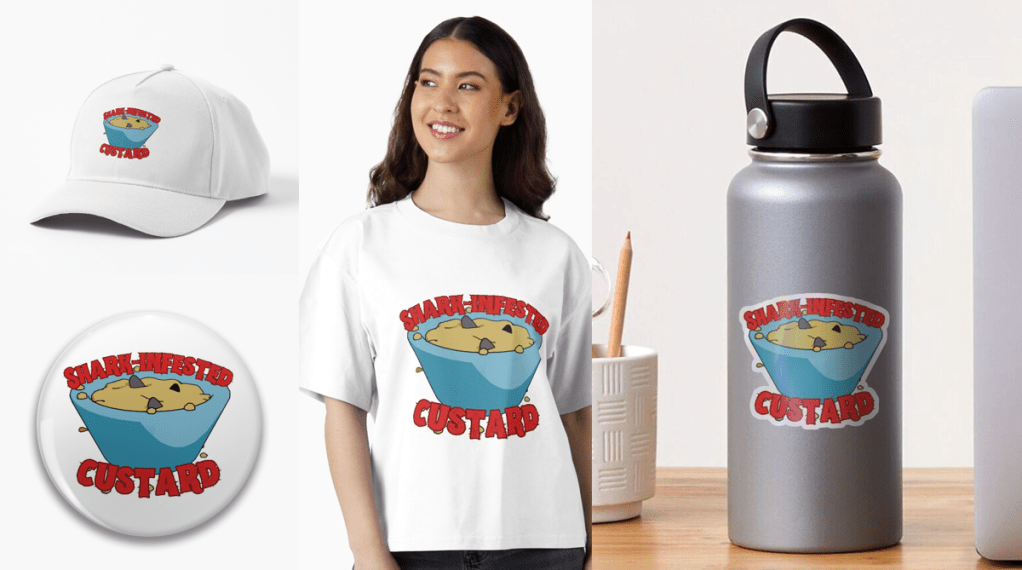
    Shark-infested custard!

    It’s an old joke, but also a bad joke. It’s old enough to be the subject of a new design to go on the RedBubble shop.

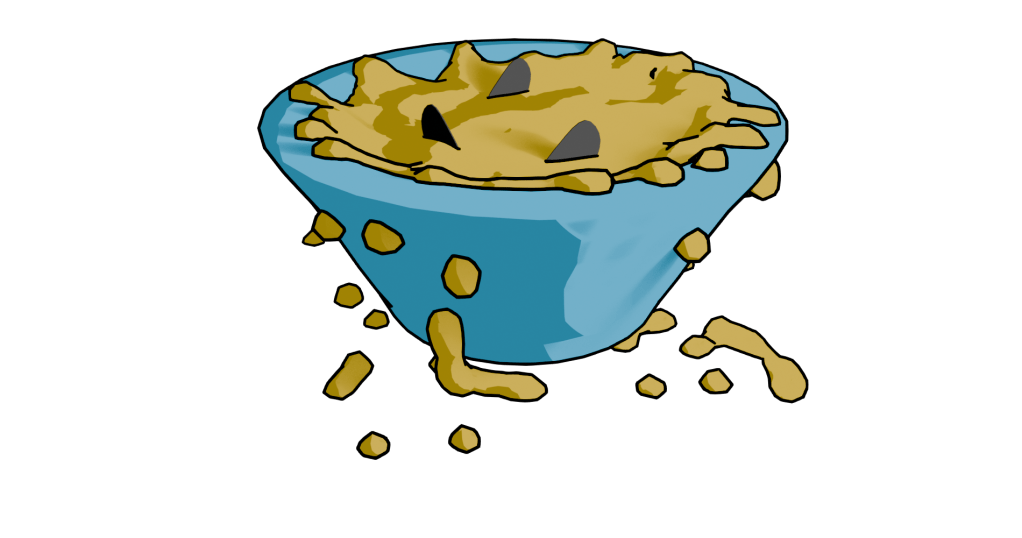
    Finished design. Lumpy yellow custard in a blue bowl with three shark fins poking out.

    Blender fluids

    To make a bowl of custard with sharks in it, I used Blender. There was no other choice, apart from drawing it from scratch. This meant three things. One, model a bowl. Two, add fluid – viscous custard. Three, add shark fins.

    Simulating a viscous fluid in a bowl is theoretically easy. Making a bowl was quick enough to do with the experience I’ve built up over the last few months. I took a cylinder, fiddled with that and made a fairly crude bowl. I did a version that was more conventionally bowl-shaped, but Mrs S preferred the straight sided version.

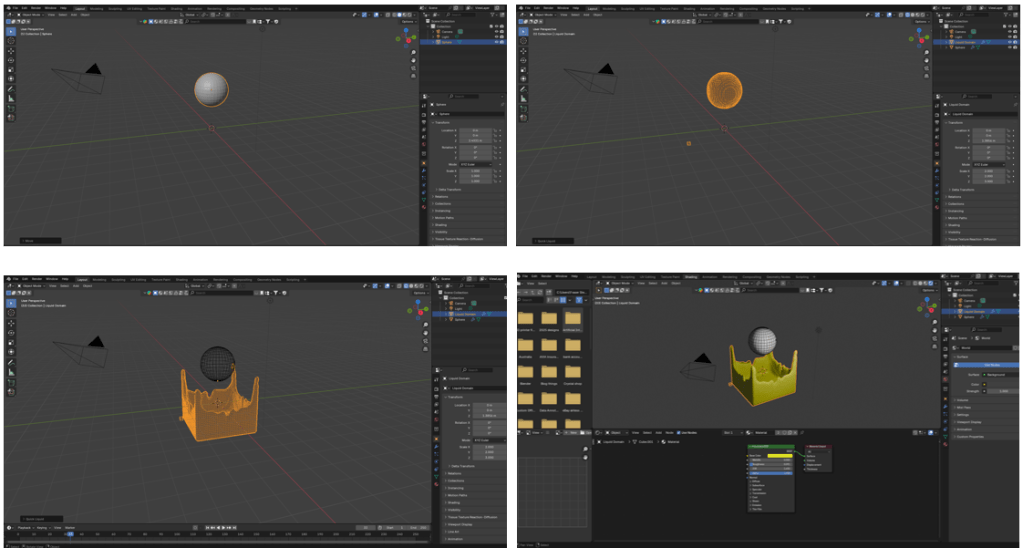
    When using fluids you have to define the space where fluids can be simulated, a source for the fluid, and what objects interact with the fluid.

    The simplest thing in fluids is to have a sphere that lets liquid out constantly into a volume. It’s not very exciting, but it’s a start.

    Fluid simulation in Blender. Make a sphere, add fluid domain (the volume where the fluid will be simulated – not visible here), then press start on the animation and you get liquid flowing. Change colour as required.

    Then you can add a vessel or other object that the fluid can interact with and overflow. You also have the option- which I used for this – of making a given volume of liquid and only generating that. I used this to make a sphere of custard that flopped into the bowl. I could adjust the volume of the sphere so that the bowl filled, but didn’t overfill.

    Shading was next. Yellow is the obvious colour for custard and a blue bowl contrasts well with that. I think a cartoon style works well for this type of product design. It reduces the number of colours in the design and also allows a for a bold appearance. To get the fins, I just added some planes and adjusted to make into fin shapes.

    After that, I ran the animation to the point where I liked the look of the piece and rendered just that frame. I rendered this with a transparent background so that the design would look good on products and also allowed me to export to Canva to add text.

    Sharks in custard
    Not the design that I went with, but close enough. There is too much custard (or not enough bowl) in this one.

    I’ve mainly used Canva for the promotional videos I make for Facebook and for some t-shirt designs. Here I added text in Hellprint font with a brown outline and was able to curve the text to a circle. This was easier than the method I used for the chilli and caffeine designs, but there is less control.

    Finished design. Lumpy yellow custard in a blue bowl with three shark fins poking out.

    Because I’m using RedBubble rather than Etsy, I can offer the design on a variety of things. I think this one works best as a sticker or fridge magnet, but it doesn’t cost me any extra to make it available on t-shirts and other clothes.

    Let me know if you have any favourite old and bad jokes that you would like to see immortalised in cartoon form.

    A selection of the products available with the ‘Shark infested custard’ design. I think the sticker works best, though I like the badge too.

  • Koffein -Redbubble

    Koffein -Redbubble

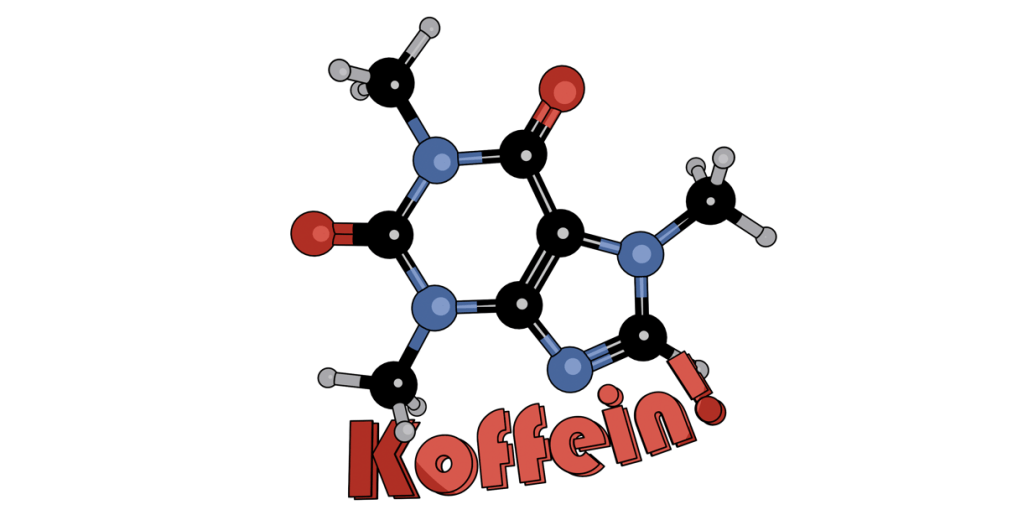
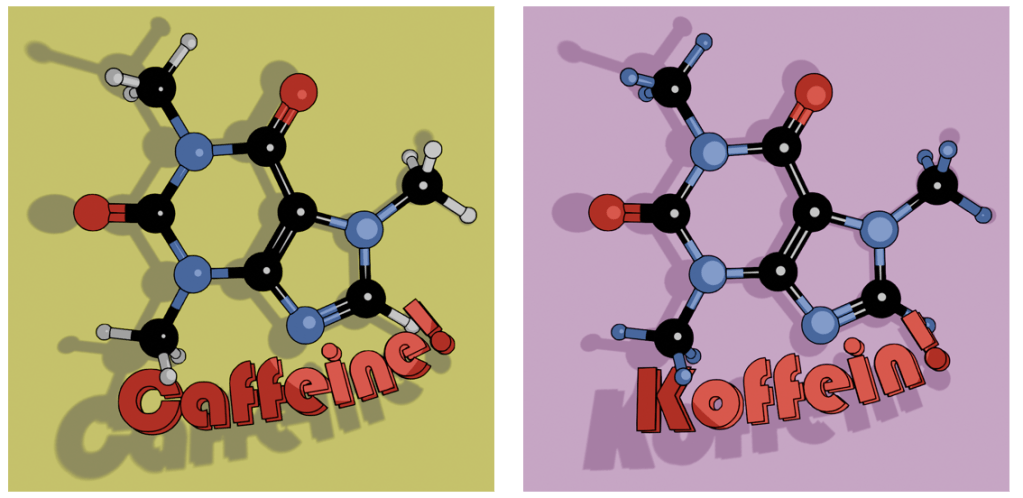
    Having done a design with caffeine, I thought I’d go multilingual with a German-language version of the design.

    This is on RedBubble, so it is available on a wide range of items.

    Cartoon of a caffeine molecule with the word 'Koffein' underneath.
    The German language version of the Caffeine design. There’s some tweaks to the lighting and a change in font, but the aesthetic is the same.

    As discussed in the previous post, this uses Bauhaus, a slightly different font to Berliner that I used in the English language version. I’ve kept the same aesthetic as before, I like the ligne clair look of the cartoon and the ball and stick molecular model is a design classic that has served chemists for decades.

    The ball and stick model was first used by August Wilhelm von Hofmann in 1865, so this year is the 160th anniversary of the ball and stick model. Hofmann’s is a name familiar to all organic chemists, with several organic reactions named after him as well as a device for electrolysing water.

  • Philo Farnsworth

    Philo Farnsworth

    Electronics pioneer – celebrated with a new t-shirt design!

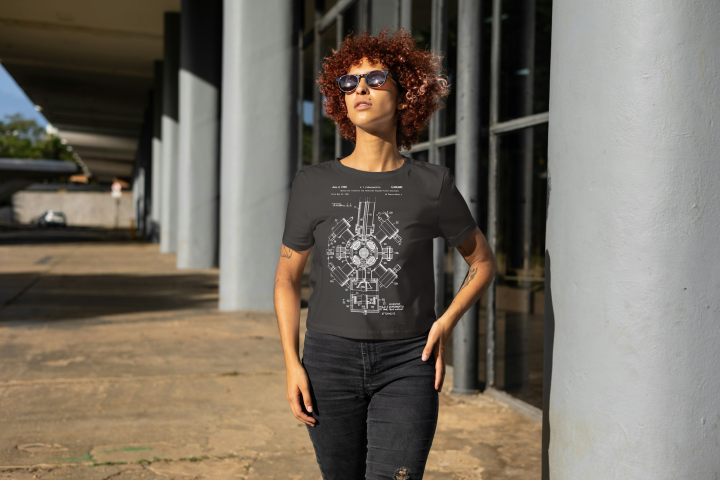
    Young female model wearing the new T-shirt design discussed in the blog post. She is standing outside a modern building.
    Mock-up of a model wearing the black version of the Farnsworth fusion patent image.

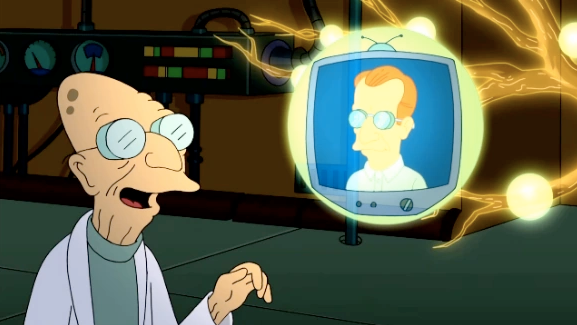
    Philo T Farnsworth (1906 -1971) is likely best known for two things. First, he was the inventor of the fully electronic display which is the basis of cathode ray tubes – he invented the all-electronic television1. Second, his name is the inspiration for Prof Farnsworth from Futurama.

    Cartoon image of Prof Farnsworth - a very old man - looking at a floating futuristic television with his namesake, Philo Farnsworth, show on the screen.
    Hubert J. Farnsworth off of Futurama. He is the 160-year-old nephew thirty times removed of the protagonist, Philip J. Fry.

    What’s less well known is his work on nuclear fusion.

    Biography

    Born on a farm in Utah, he was by any measure a genius. Some people express surprise that the son of a farmer could be the man who invented television, but then he had the sort of mind that makes the best of the opportunities presented to him. The farm his family moved to happened to have some disused electrical equipment which he was free to investigate. From this and with a like-minded friend he learned about electronics and electricity and became one of the pioneers of what was, in the 1920s, a young field.

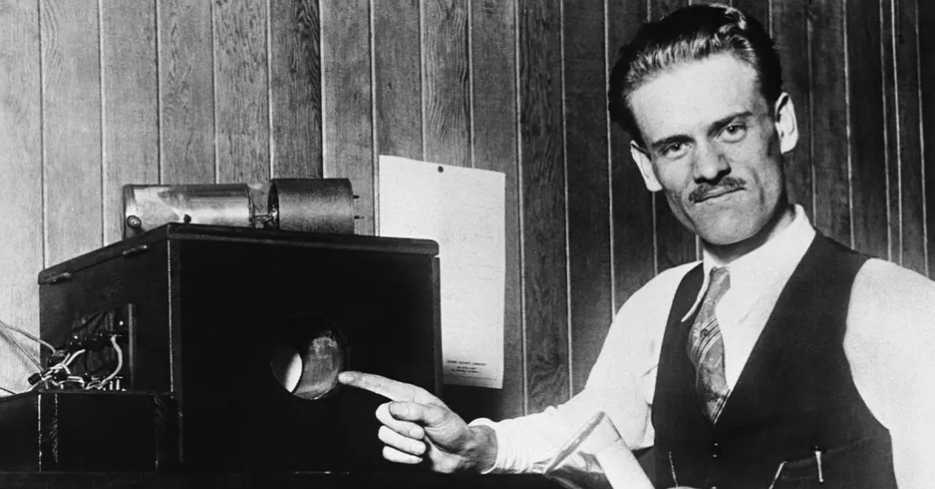
    Black and white photo of Philo Farnsworth and one of his very early televisions. The screen is about 10 cm in diameter.
    Philo Farnsworth pointing at his most famous invention, the electronic television screen.

    Electronics and electrical power

    Like all geniuses, Farnsworth didn’t concentrate on one invention. By the time he died in 1971 he had patents in several fields, including light sensors, amplifiers and nuclear fusion.

    His work on fusion reactors didn’t result in limitless free energy, as you may have noticed. But the reactor has had applications for the generation of neutrons. Why do we need neutrons? Most of us don’t need them, which is why they don’t sell them as such at Waitrose2. However, they are needed in nuclear power, medical neutron radiography, material inspection and to stimulate gamma radiation among other things.

    Black and white patent image of a nuclear fusion reactor, invented by Philo Farnsworth in 1968.
    Image from US patent 3386883, Philo Farnsworth’s Nuclear Fusion apparatus.

    The exact model shown in the t-shirt design, the Farnsworth-Hirsch fusor – is no longer used. After over 50 years, it should be assumed that progress has been made in this field, and indeed there has. Benchtop fusors have been made for demonstration purposes and there is a fusor hobbyist network whose website has far more information on these devices.

    What we have is a striking patent image from Farnsworth’s 1968 patent. I used the techniques used previously to strip the background from the image and make a file suitable for uploading onto a t-shirt in Gelato.

    Young female model wearing the new T-shirt design discussed in the blog post. She is standing outside a modern building.
    Mock-up of a model wearing the black version of the Farnsworth fusion patent image.

    I also put this design on a sweatshirt, mainly to see how that would look and if it would sell.

    This is also available with white print on a blue sweatshirt.

    1. John Logie Baird’s earlier system used a mechanical spinning disk at its core. This imparted limitations on the line count and frame rate because the holes in the disk determined both these values. The size, weight and durability of this system and the wear and tear on the parts meant that this pioneering system could never achieve the resolution people were used to in the cinema. ↩︎
    2. Neutrons are at the core of almost all atoms, so Waitrose do sell them, but mixed up with protons and electrons to form fresh ziti and other everyday essentials. ↩︎
  • Caffeine! mug

    Caffeine! mug

    A slight departure, this time I’ve designed a mug. I was thinking about what molecules would look good on a coffee mug and the obvious answer was ‘caffeine’.

    One of the things I had planned to use Blender for was to make scientific models and diagrams as well as protein and molecular models. How to do these things was another matter and how to make anything of them when the market for scientific diagrams is (a) small and (b) a closed shop were further matters.

    Having had the idea of caffeine-on-a-mug1 I hit the University of YouTube and found out how to get from a molecule to a 3D design, and then from a 3D design to a cartoonised version. This latter was a design choice – I thought it would look bold and also it would be a way of cutting down on the number of colours required for the design.

    I found a good tutorial by CG Figures who went through the two-step process to get from molecule name to a file that can be read by Blender.

    I was already familiar with one of the websites that was recommended – molview.org – and the software to convert the SMILES file into a protein database (.pdb) file was easy enough to use. The SMILES format is a standardised way of representing organic molecules and it was the format I used to input molecules of interest into a molecular modelling tool to predict the pharmacokinetics of drugs – SwissADME is the website, if you’re interested.

    Once I’d got the molecule model into Blender, there were a bunch of further steps to clean up the file into something that didn’t take up too much filespace and have extraneous faces that could give odd results when the image is finally rendered.

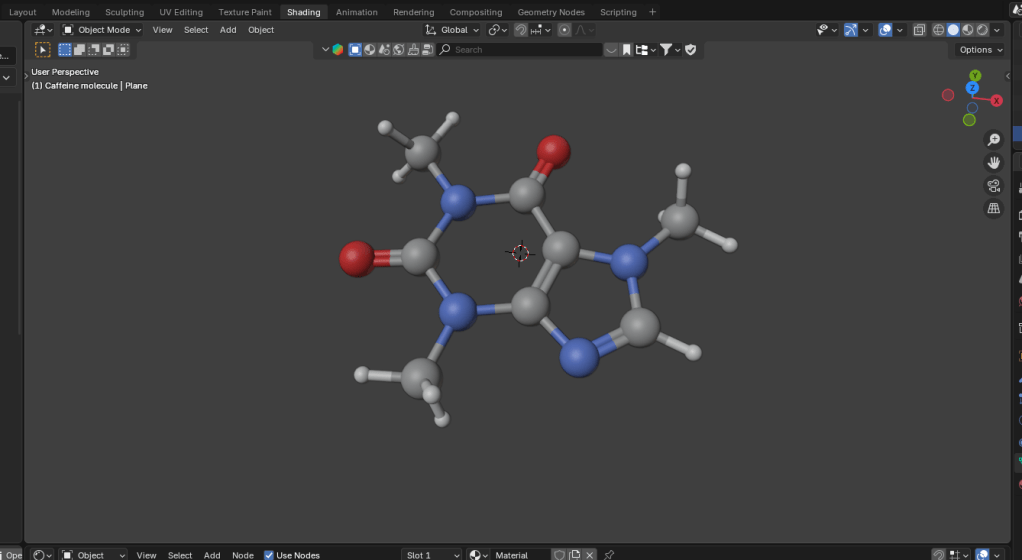
    Molecular ball and stick model of caffeine.
    The caffeine molecule after some tweaking of the initial file. The software adds colours by default, in this case grey is carbon, blue is nitrogen, red is oxygen and white is hydrogen.

    It didn’t take long to get to the point where I had a model that I could use as a basis for a design. Next, I wanted to turn it into a cartoon version. This means that the light and shade are demarcated by sharp lines with no fading.

    In Blender there is a function called a “color ramp” which takes a colour or a shade and changes it. Using this I could control which parts of the atoms were darker and which had highlights. By moving the light around I could change where the light spots landed and also change the size of the highlights. And because the software sees the molecular model as a three dimensional object, the highlights vary around the model, making the model look more three dimensional, even though the idea is to create a two dimensional image.

    Three cartoonised images of a monkey head.
    Three cartoon monkey heads. Turning the head changes the cartoon lighting and adding grease pencil adds definition to the image.

    In order to add a more cartoony look, a function called grease pencil can be used to add black lines to the scene. There are two ways to do this. Blender can add grease pencil automatically, which is what I’ve done here. You can also add it manually so that you can put details on the image.

    Anyway, back to the caffeine image. Not only did I add the cartoon effect and grease pencil, but the molecule needed a caption so we know what it is.

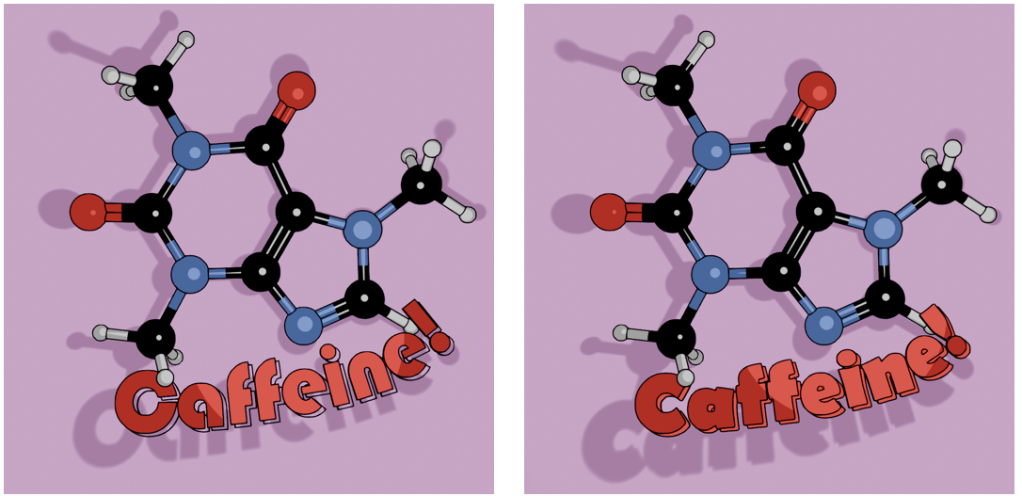
    Caffeine molecule against a pink-purple background. The molecule has the caption in two fonts, Bauhaus and Berlin.
    Alternative fonts for the caption. I like the Bauhaus font (left) as a design choice, but the capital C is a bit too closed to read easily. Berlin font (right) has a similar vibe and a more open C.

    Looking through font choices I tried Bauhaus – it’s bold and has a historic feel to it. After showing this to Mrs S, I changed to Berlin. She pointed out that the C in the Bauhaus font is a bit too closed, and the Berlin version looks better in this application.

    As an alternative, there’s also the molecule on a mustard-coloured background and in German. I’ve yet to offer these alternatives in the shop, I don’t know how big the German market for nerdy science mugs is2. I will likely keep the Bauhaus font for this, since the K looks echt cool, oder? I’ll need to use either Berlin or another font for the French (caféine), Spanish and Portuguese (cafeína) and Italian (caffeina) versions.

    Two view of caffeine (Bauhaus font) and Koffein. Mustard yellow background or pinky purple? Which is better?

    I can try other background colours, but I’m not sure what works best. Any suggestions are welcome.

    The finished design could then be uploaded to Gelato so I could put that onto a mug and then get it published on Etsy.

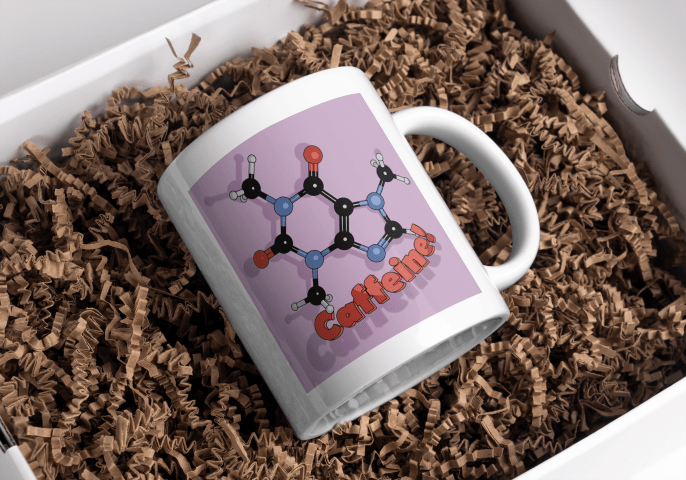
    White mug with a cartoon caffeine molecule on a pale purple background, and the word 'Caffeine!' underneath.
    Mock-up of the finished mug nestled in a bed of curly brown stuff.
    1. It’s not an original idea. There are plenty of other places that sell this sort of thing, but I wanted to use a different style. ↩︎
    2. Caffeine translates as ‘koffein’ Danish, Dutch, Finnish, Polish, Swedish and Norwegian as well. ↩︎
  • Vintage Patent T-Shirts for Cycling Fans

    Vintage Patent T-Shirts for Cycling Fans

    New t-shirt design!

    Young man in a white t shirt
    This is the latest in the series of Patent-inspired t-shirts.

    I want to ride my bicycle

    I want to ride my bike

    I want to ride my bicycle

    I want to ride it where I like

    I’ve not ridden a bike for over 30 years (last one was stolen in 1993) so I’ve missed out on a lot of the developments in bicycle technology. I do enjoy watching the Tour de France, though, and one thing I was well aware of is the use of derailleur gears – they’ve been around since before I was born.

    I was maybe 13 when I got my first multi-gear (10 speed, as I recall) bike after I’d outgrown the 3-speed one I got when I was 81. We’d moved to England by then, and where we lived wasn’t very hilly but also not so busy that I was in danger when out on the roads.

    The rear wheel of a bike is probably not considered much by non-riders. It’s the wheel that turns when you turn the pedals. But the mechanism that controls the gears is the subject of much debate and engineering over the years.

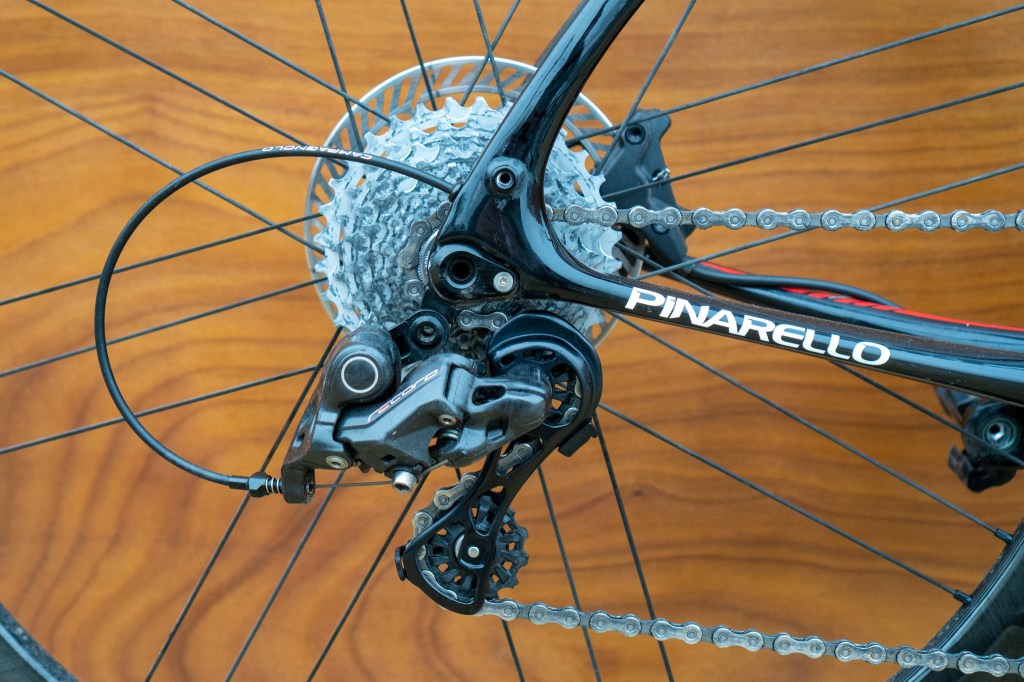
    Read axle of a bicycle, showing the derailleur system.
    Rear gear bit of a bike. The derailleur is the black Z-shaped thing which controls the chain as it hops between the spoke wheels on the axle and also maintains chain tension as the gear size changes.

    Back in the old days (very old days) bikes didn’t have gears. The penny-farthing had a huge wheel and, if you found the hill was too steep, you hopped off and pushed.

    Variable gearing initially involved having two gear spokes on either side of the back wheel and then getting off and turning your wheel around to go uphill (or downhill). I don’t know if there’s any footage of Tour de France competitors doing this, but your skills in fixing a bike were at least as important as your riding ability2.

    The derailleur is a remarkably old invention, with the first rod-based systems being invented in the late 19th century. There is a book on this called ‘The Dancing Chain’ by Frank Berto, but it’s at least £75 and I’m not that into cycling.

    Never an organisation to rush into making things easy for competitors, the Tour de France resisted such new-fangled innovations for many decades. Finally, in 1937, competitors in the Tour were allowed to use derailleur gearing. The effect this had on the average speed of the cyclists was minimal – an increase from 31.1 kph to 31.8 kph was about average for the speed year-on-year speed increase at the time (BikeRaceInfo.com).

    Shimano gears

    Founded in 1921 by Shozaburo Shimano, Shimano is one of the watch-words in the bike community. Their gears and groupsets (gears, gear changers, etc) are regarded as the best by many riders.

    Pro teams currently using Shimano gears include fourteen of the eighteen UCI men’s World Tour (the top ranking pro teams) and four of the fifteen UCI Women’s World Tour teams.

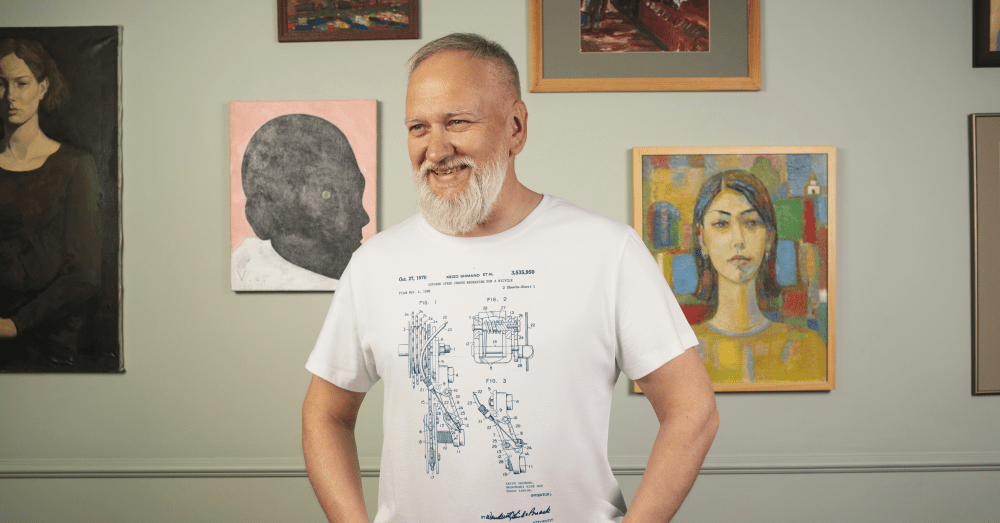
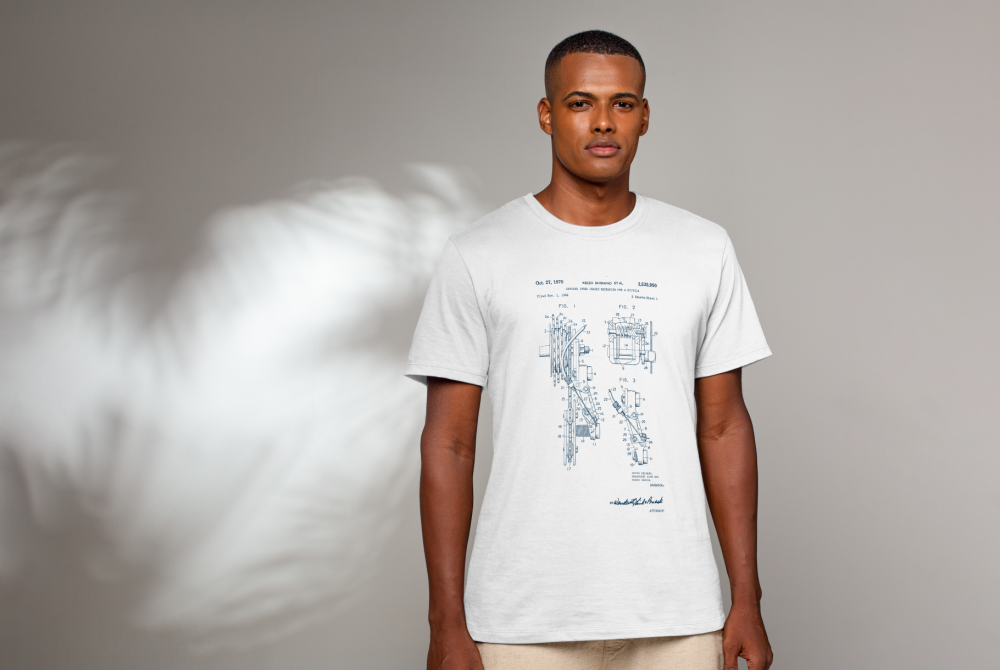
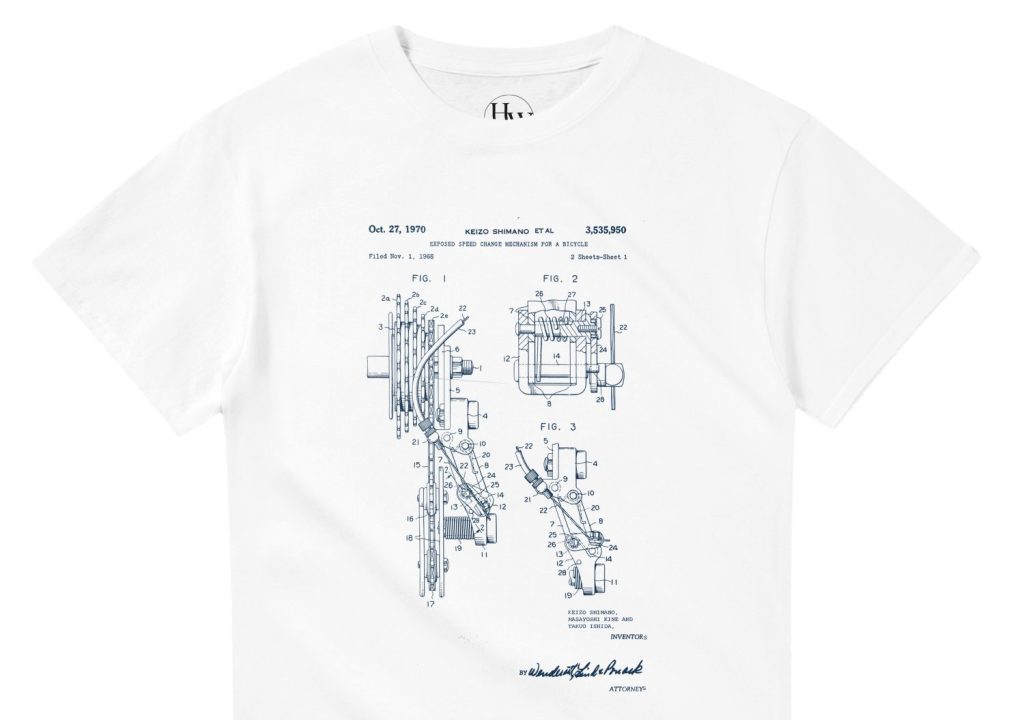
    So in honour of this, I researched the early stages of derailleur gears and found the 1970 patent co-authored by Shozaburo’s son, Keizo Shimano. I think this was the basis of the Dura-Ace gear set that remained popular for a couple of decades.

    Blue patent design on a white t-shirt
    Shimano derailleur gearing patent, blue on a white t-shirt.

    The patent design is now available as blue on white or (coming soon) white on blue or black in my Etsy shop.

    Now in black or blue, after a bit of a delay.

    Disraeli Gears

    As I said at the top derailleurs have been around since before I was born. Indeed, Cream’s 1967 album Disraeli Gears was so called when one of the group’s roadies dropped this malapropism when he heard that Eric Clapton was buying a racing bike.

    Let’s listen to one of their songs from that album.

    1. This had hub gears, which I never worked out the mechanism for, there’s just a chain that disappears into the axle. It’s probably magic. ↩︎
    2. The spirit of the individual cyclist riding the Tour is typified by the story of Eugène Christophe from the 1913 Tour. He was leading by 18 minutes and descending the Tourmalet when his front forks broke. It took him two hours to reach the village at the foot of the mountain. He found a blacksmith who would let him use his forge – the rules stated he had to make repairs alone – and, after three more hours he set off with a mended bike. Race officials gave him a 10 minute penalty because a local boy pumped the bellows of the forge for him.
      He eventually finished seventh overall. ↩︎
  • Frank Whittle: The Inventor Behind Modern Jet Engines

    Frank Whittle: The Inventor Behind Modern Jet Engines

    Another T-shirt design, this one based on a patent image.

    Frank Whittle – a summary

    Air Commodore Sir Frank Whittle (1907-1996) was a test pilot and flying instructor, but he is best remembered as a pioneer of jet aircraft. It was he who convinced the British government that the standard propeller engines had speed limitations (based on calculations made while writing his thesis) and that yes, he had a solution.

    The problem was that conventional engines with hundreds of moving parts would inevitably fall apart when pushed beyond what was possible with contemporary materials. The solution was to reduce the power plant to a single moving part. He needed people to believe in his solution. He also needed money, which the government of early 1930’s Britain was reluctant to give him.

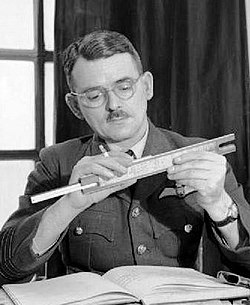
    Sir Frank Whittle with a slide rule.
    Sir Frank Whittle (1907 – 1996), one of the pioneers of jet propulsion.

    He co-founded Power Jets Ltd in 1936, a company which was able to exploit his 1930 patent for a turbojet engine with only one moving part. By the time the Second World War started, he had finally convinced the government that he had a usable and safe design. They bought the experimental engine from Power Jets and lent it back, allowing the company to continue until the company was nationalised in 1943.

    All this effort took its toll on Sir Frank. Nervous exhaustion forced him to retire from the RAF in 1946, but not before a further jet propulsion system could be patented in his name. It is this that forms the basis of the new t-shirt design.

    Discworld connection

    The term ‘Whittle’ came up in the Discworld series. In “Guards! Guards!” we are introduced to Lady Sybill Ramkin, a wealthy resident of Ankh and enthusiastic breeder of swamp dragons (draco vulgaris). She used “whittle” as a term for disappointing dragons such as Goodboy Bindle Featherstone of Quirm (aka Errol), who would never amount to much. Short, stubby wings meant Errol would never fly and would therefore be incapable of mating.

    Sam Vimes, Captain of The Watch, reflects on this dismissive adjective:

    Total Whittle, Vimes thought… It sounded like whatever it was you had left when you had extracted everything of any value whatsoever. Like The Watch.

    As it turns out, Sir Frank was something of a whittle himself. Standing five foot tall and with a small chest measurement, he failed the RAF medical (twice) when he applied. Luckily for him and for the development of the jet engine, he found a way in to the RAF. And it all came good for both Sir Frank and Errol – Sir Frank applied again and rose to be Air Commodore. Errol learned to fly and was last seen flying into the distance with a noble dragon (draco nobilis) which had terrorised the city.

    Errol the dragon takes flight!
    Errol the ‘whittle’ takes flight during the climax of “Guards! Guards!”. This is the book where we meet Sam Vimes, one of the Discworld’s best characters.

    It all ends well for Sam and the rest of the Night Watch. The men get a pay rise and a new dartboard, Sam finds love and companionship with Lady Sybill.

    Whittle’s patent

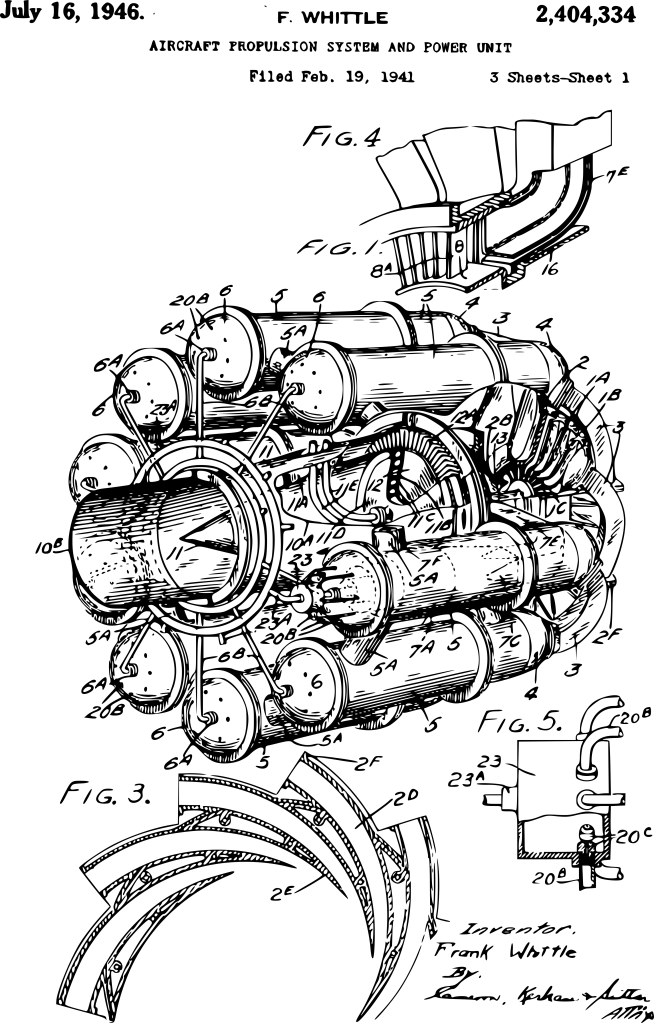
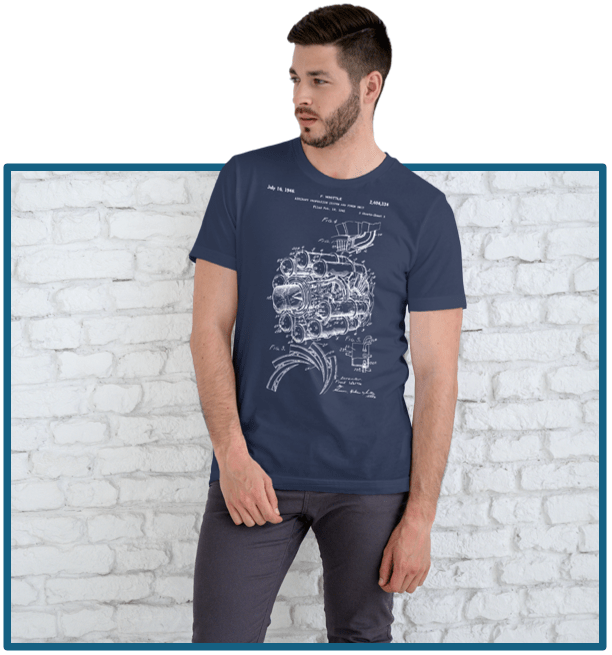
    All of this leads back to the landmark invention by Sir Frank, the jet engine. In 1946, he was granted US patent 2404334 for an aircraft propulsion unit – a jet engine. This wasn’t the first, and wasn’t the last, but it does have the big advantage from my point of view that it has a striking image to go with the patent.

    Frank Whittle's 1948 patent for an 'Aircraft propulsion and power unit'.
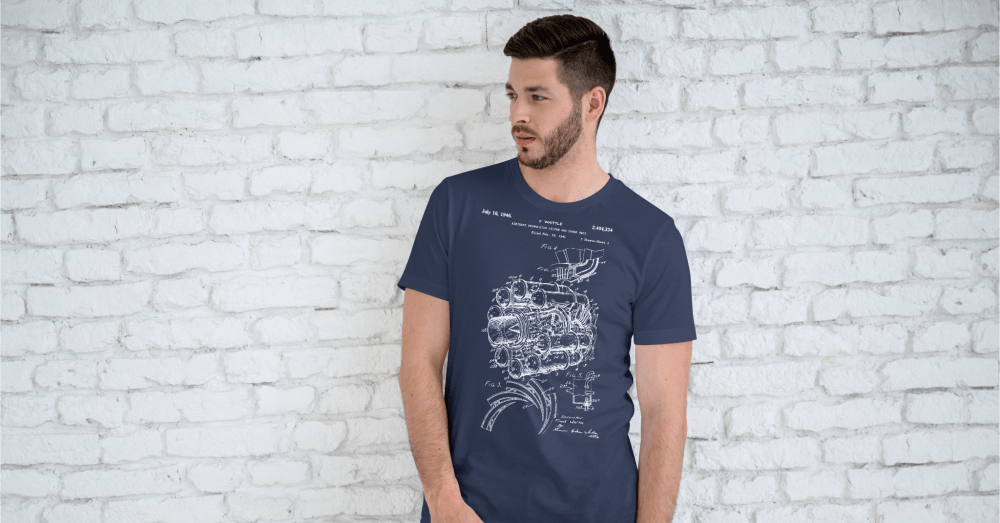
    Cleaned-up version of the patent image. I used Inkscape to remove the background, leaving just the black images. I then saved it as a white version to show up on the dark blue t-shirt.

    T-shirt design

    The patent image used started out as shown above. Using Inkscape, I could remove the background and be left with an image of just the text and drawings. Two things need to be done before I can put the design on a t-shirt. First, I need to choose the colour for the printing. Second, I need a fine scale render (high dots per inch (dpi) count) of the image. Inkscape can do both, so I got a 500 dpi image in white (which I won’t reproduce here).

    I chose a dark blue t-shirt so that the image looks like an engineering drawing. Patents are not engineering drawings, but using blue adds a nice aesthetic to the design. Blueprints were so called because they were printed in white on Prussian Blue paper.

    There is a useful website (colordesigner.io) which will give the Hex codes for any colour so that the correct colour can be programmed into a colour rendering app. Gelato, who I use as the print on demand supplier, also give the Hex codes for their t-shirts (or at least the T-shirts I’m using). There is also a colour comparator site so that you can see how close two colours are.

    Prussian blue compared with Navy blue.
    This is a comparison of Prussian Blue (left) and Navy blue (right). Prussian is a bit more purple and lighter, but there’s not a lot of difference.

    Am I going too far with this? Maybe, but it’s best to be correct about these things even if nobody notices.

    The closest blue t shirt available was Gelato’s Navy Blue. I can’t tell the difference unless the colour are next to each other.

    So, finally, I was able to put a white design on a blue t-shirt. Then it was a matter of getting some virtual models to do virtual cat-walks for me and upload everything to Etsy.

    Another image of the model in his t-shirt. He looks well happy.
  • This is a chord…

    This is a chord…

    Hand crafted design!

    I was never a punk (always a metalhead), but I still appreciate the aesthetic and the music. The Damned, Siouxsie and the Banshees, Talking Head, Killing Joke – all good. There is a case for the punk ideal being the springboard for the new wave of British heavy metal, from which Iron Maiden sprang and made the world whole. But that’s for another blog post.

    When punk first started to take hold in London, a fanzine called Sideburn needed to fill a page in its first edition, so the co-founder (and fan of The Stranglers) Tony Moon drew the illustration below. It captures what I see as the punk attitude – anyone can have a go. Whether you will be good or successful or happy is another matter, but at least you tried.

    Original ‘This is a chord’ artwork by Tony Moon from Sideburn #1.

    It’s a wonderful mindset to have and one I wish I had embraced earlier in life. Ah well.

    With the need to start a business to bring in money since there isn’t a lot of suitable work around, I started Heath Way Prints in January 2025. Inspiration for designs isn’t a problem; finding how to transfer the idea onto a physical thing was the issue. Thank goodness for the University of YouTube.

    Taking inspiration from Tony Moon and my love of puns and maths, I realised that there are other definitions of ‘chord’. A chord is a line that crosses a circle’s circumference twice. Any triangle can be enclosed within a circle, so the three sides of such a triangle are chords. So, three chords form a triangle.

    I drew out a version of Moon’s original with this in mind.

    I tried to keep the lettering consistent with the original, but also had to bear in mind that the shape of the printing space on a t-shirt is squarer than the fanzine pages.

    All I had to do now was transfer this to a t-shirt and use a print-on-demand service to sell the t-shirts. Easy.

    Well, not so easy. I used the photo (photo because I don’t have access to a scanner) of my original to try out a t-shirt design using Gelato (the Print on Demand partner I had decided to use). The image was less than good. The white of the photo background was included in the image and it looked bad.

    I used Inkscape to remove the background. I followed a video by Daisy Multifacetica, and was able to change the colour of the text as well. So I had the option of black, white or any other colour. Really depends on the t-shirt colour.

    The black-on-white colour option is fine, as is the white on black. But there is a colour scheme that is synonymous with punk – black and pink on yellow.

    Designed by Jamie Reid, the cover of the Sex Pistols’ debut is a striking graphic and a popular colour choice in punk and punk-adjacent work. So I’ll do the same.

    I used the website schemecolor.com to get the correct pink – French Fuscia – and the hex code so I can get the right shade. The yellow isn’t really something I can control, since I am limited by what Gelato offer. Luckily, the yellow of their t-shirts is close to the yellow on the original album.

    Once I had a selection of colours I could then go to Gelato and design the t-shirt.

    In order to have a chance of selling, I need good pictures of the design in place. Luckily, Canva (another online design site) has the facility to add a design to images of models so shoppers can see how the t-shirt looks when it’s being worn. I did a few, because Etsy allows you to add 10 images and a video to the listing.

    The featured image at the top of the blog is one photo. They have a range of ages, ethnicities and genders to choose from.

    I made a montage video of the prepared images, which you can see on the listing on Etsy.

  • Etsy shop

    Etsy shop

    I set up an Etsy shop to sell t shirts some time ago, but I don’t think I’ve given it enough attention. I’ve certainly not blogged about it. There’s a lot of stuff to learn, designing the shirts is the least of it.

    My initial idea for designs was to use old patent images from guitars, jet engines and other tech. It took a while to find how to remove background from the pictures so that the prints didn’t have a huge area of white. This would look crap and my t shirts wouldn’t sell.

    I found Inkscape to be the easiest app for this. Luckily there’s YouTube videos that show how to do this; the first one I found was in Spanish, which I don’t know (apart from una cerveza, por favor) which confused me, but then I found the same woman’s English version. Hurrah!

    There’s a list of peripherals needed for the Etsy shop. I used Canva to design a logo, which I can put in the back of the neck of the t shirts. Then a banner; this had to wait until I’d made some t shirt designs to populate the banner with and learned how to make mock-ups. Again, Canva was the app for that.

    Logo for Heath Way Prints online shop
    Logo for the online shop. I tried to keep it simple and functional.

    I spent a chunk of today changing up the logo to make a rotating gif. I’d done this sort of thing with a beer logo so this was a bit easier than it might have been1. Still took me a couple of hours because I’m only about 100 hours into my Blender learning.

    Spinning beer logo, complete with shiny edges.

    I took some colour advice from Mrs S and we decided a green background would be good.

    Spinning logo on a green background.

    Then I uploaded it to Etsy, only to discover that the logo won’t be animated. Bums. Still, I had a decent purple still image instead, which I’ve used for the shop logo.

    I had searched for print-on-demand providers, these are companies who will print t-shirts for you as and when they are ordered. I signed up to Gelato, who seemed fine. Other POD suppliers are available and have a different range of items that can be ordered. Not just T-shirts, but sweatshirts, romper suits, hoodies, wall art, mugs, hats and other stuff.

    I may do a post on how to get from design to t-shirt and into Etsy, but I may have stretched your patience already. Anyway, the link to the shop is below, and I will do a post about the design of some of the t-shirts.

    https://www.etsy.com/shop/HeathWayPrints?ref=seller-platform-mcnav

    1. I followed a tutorial by Polyfjord, which laid out the steps very nicely. https://www.youtube.com/watch?v=zthvZvw-yJE ↩︎