Author: Fraser Steele

  • Baaa Humbug!

    Baaa Humbug!

    A Heath Way Prints design.

    The ‘Baaa Humbug!’ design on a t-shirt, apron (with holly), cushion and pin badge.

    This was an idea from Mrs S – a sheep with a humbug1 body.

    Sheep building

    The modelling of the sheep was the main challenge here. I decided to go for a ‘low poly’ design, similar to the fearsome dinosaur I made as part of the course I did in March ’25.

    Returning to the University of YouTube, I followed a video by Ryan King, who is a reliable tutor and another one who doesn’t skip the fiddly bits. He made a duck, a shark and a dog in this tutorial, the dog was the best one to follow for the sheep, what with having four legs and all.

    Making a low poly sheep is an exercise in making a tube and shaping it to match a sheep (I used a photo of a sheep as a guide) and then adding legs and ears.

    The start of the sheep construction process. Using a side-on view of a sheep, a tube is extended and squidged to make a sheepish body. Legs are added by extruding from the sides.

    Shading

    The shading was the complex bit. I wanted to have a cartoon look to the sheep because that’s an aesthetic I like and also makes the final print a bit clearer.

    I’ve done quite a lot of cartoon shading over the last couple of months, the tricky part was getting more than one colour onto a cartoon.

    The basic cartoon shader. It converts the original colour to RGB (not sure why), then the colour ramp restricts the colours to two shades, dark and light. This gives a cartoon shading effect that I’ve grown fond of.

    Doing one colour is easy enough, it’s two shader nodes. Adding a striped pattern and getting the stripes to mimic a humbug was a bit of a thinker. In the end, I found a way of doing it using various shader nodes.

    The humbug shader. I used a photo of humbugs to get the right colours. This is a bit more complex than the single shader, since the system needs to be told where to put the brown and white colours.

    So we can go from a plain white or brown sheep to a striped sheep. Then we need to add outlines.

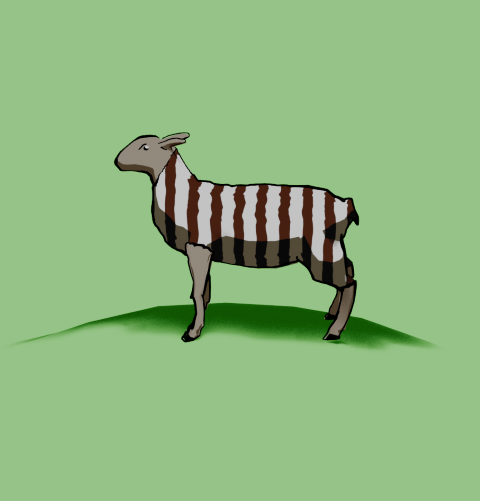
    From left to right, a plain white coat, a brown coat (colour for the humbug stripes), stripes added and then with outline and frown drawn in.

    Outlines

    I’d previously used the system’s grease pencil to add lines to cartoons and it works well. For the cartoon mech, I just thickened the lines a bit but otherwise didn’t adjust the grease pencil added by Blender.

    Another variation of the two legged mech I made a few months ago. This cartoon version has ‘scene line art’ added, automatically adding lines to the model.

    Well, most of the time it works well. But this time it didn’t, adding lines where I didn’t want them and missing out other lines. So I had to draw the lines myself. I’m part way through an 2D animation course so I had learned about adding lines and editing them already. I applied this new knowledge to the sheep, using a drawing tablet I bought a few months ago. This meant I actually learned how to use it.

    My graphics tablet. This one cost £24, the ones professionals use can be in the hundreds of pounds, even over a grand. I’ve also just noticed that there are thumbprints on the left side where I hold it.

    Once I’d drawn the lines I was able to adjust them. Because I’m not much of an artist and I’m not used to the graphics tablet, the lines weren’t perfect. However, because they are digital, the lines are editable, so I could move and stretch them until I was happy with the look. This is similar to the way I sculpted the virtual clay to make Bob the demon and Steve the orc. I didn’t want it to be too perfect, just believably hand-drawn.

    Somehow, I managed to get the sheep looking really grumpy as well. A fortunate accident with the line I drew for the eye ridge.

    Final design

    I exported the final sheep into Canva to add the background and lettering. The font is IM Fell English, based on an 18th century script and so perfect for an olde worlde feel.

    One version of the “baa humbug” design.

    Because I’m using RedBubble rather than Etsy, I can offer the design on a variety of things. In RedBubble I can also specify the background colour to be used in the designs; I can do that in Canva, too, but the shape of the different products means that sometimes there can be white space at the sides or the design looks too small on the product.

    Baaa humbug design on an apron.

    At the suggestion of Mrs S, I added a sprig of holly to the design that goes on the apron. Not sure why, but it works for the apron but not for the other items such as t shirt and cards.

    1. Humbugs are striped, mint-flavoured sweets. ↩︎
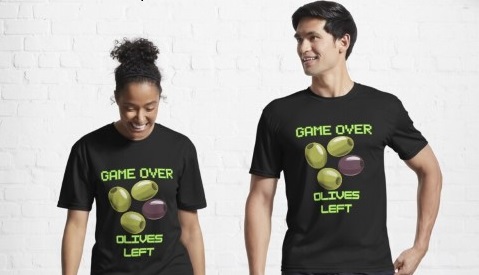
  • Game over!

    Game over!

    Heath Way Prints design.

    This was a cryptic crossword clue I thought of some time ago, and realised recently it would make a good t shirt/ mug/ mouse pad etc.

    Canva design

    I think it took me about 20 minutes to do this, all in Canva. Deciding on the fonts to use was the tricky part. What I really wanted for the ‘Game Over’ part was the sort of font used in Rollerball1 and throughout the 1970s to indicate that a computer was involved. There is a font called Rollerball, though Westminster is also available for Word, but I couldn’t work out how to get that in to Canva. So I used Retropix for the Game over, and HK Modular for the Olives left. A nice neon green, reminiscent of the old green screens I spent my early computer years staring at completed the text design.

    Example text for the Westminster font.

    The olives were taken from a Canva catalogue of designs. There were plenty of olive designs to choose from, the three green and one black in a cartoon style was the best, and similar to what I might have designed myself.

    Once I was happy with the design I downloaded it from Canva then uploaded it to RedBubble. Making sure the design looked right on all the products and writing the description and keywords still takes me some time, but I hope I’m getting better at this.

    I finished a social media marketing course in November, this taught me several things I had hoped to learn. How to build a website, the importance of keywords and how to do search engine optimisation. I’m still a beginner, but I now understand why you need to spend time doing the SEO, though the rules change all the time.

    Cryptic crosswords

    The clue I had knocking around was:

    Game over for oil producers? (6)

    The answer is ‘OLIVES’, because when you have no lives left you finish a game, and olives produce oil. The O and the zero look similar, and that’s how cryptic crossword clues work. I sometimes struggle with cryptics, I attempt the Private Eye one and sometimes I can finish it, other times I can’t get more than two clues.

    Another clue I made up a while ago:

    Advances in fantastic trousers (5,7)

    Comment if you know the answer.

    1. A 1975 film starring James Caan, featuring the titular ultra-violent sport and a lot of moody electronic music, set in the far-off dystopian future of 2018. ↩︎
  • Slow beef stew

    Slow beef stew

    A favourite most of the year, more so when it’s chilly. This version takes two hours or more to cook. There’s a fast recipe that takes less time and uses a pressure cooker.

    Timings: prep – 10 min Cook – 2 hours (or more)

    Feeds four. Total cost (Nov 2025): £6.00 (stew) 60 p (dumplings)

    Timings: Prep: 30 min. Cooking: 40 min Eat: 10 min

    Ingredients

    Stew

    400 – 500 g cubed beef

    Half a diced onion

    two cloves garlic

    two carrots, diced

    400 g potatoes, cut into 2 cm pieces

    one turnip, dice to the same size as the potatoes

    Dried herbs – oregano, thyme and a bay leaf

    Fresh rosemary (from the garden)

    chilli flakes

    beef stock pot

    Veggie gravy granules

    can of cannellini beans

    Dumplings

    100g self raising flour

    50g suet (beef or vegetable)

    Salt and dried herbs (a teaspoon or so of oregano, some black pepper and anything else you fancy)

    water

    The beef is the main cost of this dish, you can economise a bit but with cheaper beef you get more hard fat, which is unpleasant.

    You’ll need a frying pan and a casserole dish.

    Your choice of veg to add to the stew is personal, of course. I add turnips because they add an earthy taste to the stew, which not everyone likes.

    1923 Bamforth postcard celebrating the turnip. James Bamforth & Co were probably best known for their saucy seaside postcards
    Turnip! Baldrick’s favourite vegetable, they add an earthy flavour to the stew. Swedes can also be used.

    Preheat the oven to 160 C/ gas 5.

    Brown the beef in a little oil and add to the casserole dish when done. Fry the onions, garlic, herbs and spices before adding them to the pan. Dice the potatoes and turnip and add these to the rest of the ingredients. Add the stock pot or stock cube.

    Beef, potatoes and turnip in the pot. Onions, garlic and herbs are hidden. Need to add cannellini beans and stock.

    Drain a can of cannellini beans, add these and enough water to cover the ingredients. Give the while thing a good stir and put in the oven for at least 2 hours.

    Beans and stock added. Now to cook for at least two hours.

    Make the dumplings: Add the flour, suet, herbs and salt to a bowl. Gradually add water and stir well to get a dough that you can form into balls. These don’t need to be perfect. If the dough is too wet, add flour to the mix until you’re happy with how the dough behaves.

    Uncooked dumplings. You don’t need to be very rigorous getting spherical dumplings, rougher dumplings will fluff up just the same.

    About 20 minutes before serving, add the dumplings to the stew and cook for a further 20 minutes.

    Slow cooked beef stew recipe.
    Dumplings done, stew ready to serve.

    I did this using the slow method because we had to split out mealtime. Younger daughter has tap lessons that run until nearly 9 o’clock, so I served the rest of us at seven, then reheated the stew and added fresh dumplings to cook while I went to get her.

  • Butternut squash soup

    Butternut squash soup

    Younger daughter made this for us, loosely based on a recipe from BBC Good Food but adapted somewhat. This is a spicy version, alter the amount of chilli as you wish.

    Timings: Total = 2 hours. prep – 10 min Cook – 30 minutes. Total includes ‘leaving to absorb flavours’ time.

    Feeds four. Total cost (Nov 2025): £3.00 (soup) £2.00 (nice bread)

    Ingredients

    One butternut squash (about 1 kg)

    1 tablespoon butter

    2 tablespoons olive oil

    1 onion, diced

    2 garlic cloves

    1 tablespoon dried chili flakes

    1/2 teaspoon paprika

    800 ml vegetable stock

    4 tablespoon crème fraiche

    You’ll need a roasting dish, a large saucepan and a blender. We used a stick blender for this. A large plastic food box or a large zip-tie bag will also be needed.

    Peel, deseed and dice the butternut squash.

    The skin of the butternut squash is quite thick. Either use a good peeler or a knife to remove the skin.
    Scoop the seeds out with a tablespoon. You can dry them off and separate from the stringy bits then roast them for a snack.

    Add the olive oil and paprika to a large plastic food box or a large bag. Add the diced squash, mix well and leave for an hour to absorb the flavours. You can use a bowl to do this if you don’t have a box or bag to hand.

    Set the oven to 180 C/ gas 6. Fry the onions in butter over a low heat. After 5 minutes, add the garlic and chilli flakes and continue to fry.

    While the onions are frying, put the squash and the oil into a roasting dish and roast for 30 minutes. Stir them at least once during the roasting.

    After 30 minutes the squash will be soft (squashy!) and the onions slightly caramelised. Add the vegetable stock to the onions. Take the squash out of the oven and add this to the stock.

    Diced squash, roasted.
    Add the roasted squash to the onions and stock. This will add some much-needed colour to the soup.

    Using the stick blender (or other device), liquidise the soup until it’s smooth and lump-free.

    The stick blender makes the mushing up of the squash easy. If you want a smoother soup, a liquidiser is a better bet.

    Warm through and add the crème fraiche either to the completed soup or swirl into each serving as you dish up.

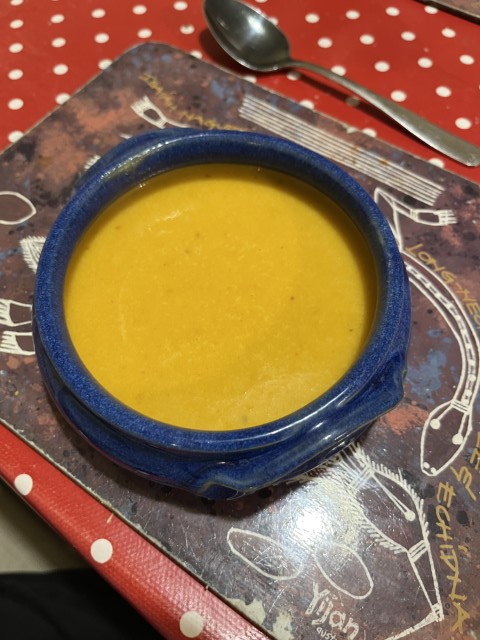
    Finished soup. We got some crusty bread to go with it. A sprinkling of parmesan would also add to the flavour.

    We got some nice bread to go with this, though regular Warburtons (or other sliced bread) is fine as well.

  • Eve’s pudding and custard

    Eve’s pudding and custard

    This was a favourite growing up. My mum would often make puddings on Sundays – how she found the time I don’t know.

    Feeds four.

    Timings: Prep: 30 min. Cooking: 40 min Eat: 10 min

    Ingredients

    Filling

    600 g Bramley apples1

    Caster sugar to taste (about 60 g)

    Lemon juice

    Mixed dried fruit (optional)

    Sponge topping

    100 g caster sugar

    100 g butter or baking margarine

    2 eggs

    100 g self-raising flour

    Custard

    100 ml double cream

    350 ml whole milk

    2 egg yolks

    1 1/2 tablespoons cornflour or sauce flour

    50 g caster sugar

    1/2 teaspoon vanilla essence

    You’ll need a big saucepan, a large bowl and a baking dish. An electric mixer will also help.

    Peel and slice the apples and heat gently in a saucepan. Add the caster sugar to taste2 and lemon juice to stop the apples going brown. Once they have started to fluff up turn off the heat and allow to cool. Take the butter out of the fridge.

    When the apples are cooled, set the oven to 160 °C (fan), gas mark 5. Put the apples into a buttered oven-proof dish. If you’re adding dried fruit or mincemeat put this on top of the apples.

    Apples in a dish with some dried fruit on top. This is the stuff that I use for fruit cake, it includes dried peel as well as raisins and sultanas.

    Start making the sponge while the oven heats up.

    Add caster sugar, butter and self-raising flour to a mixing bowl. I used a plastic bowl – ceramic bowls are supposed to be better for this type of thing since they keep the batter cool. Crack the eggs into the dry ingredients and beat for at least five minutes. An electric mixer is best for this, do it by hand if you’re feeling strong.

    Sponge batter in a pink bowl.
    Finished sponge mix. You need to mix this for at least five minutes to get air in so the sponge will rise.

    Put the sponge mix on top of the apples. Make sure it’s covering the apples, then pop it in the oven for 40 to 50 minutes.

    When it’s done, the sponge should have risen and be a nice golden colour.

    Eve’s pudding. Remembered while I was dishing up that I needed a photo for the blog.

    Serve hot with custard (method below) or ice cream.

    With custard!

    Custard

    Make the custard when you’re ready – this should be timed to make sure the Eve’s Pudding is still warm.

    Put the cream and milk in a pan and warm through to just below boiling. If you have a thermometer, heat the milk to about 85 °C.

    In a large bowl, whisk the egg yolks, cornflour, sugar and vanilla. A hand whisk will be fine for this.

    Cornflour, sugar, egg yolk and vanilla essence, mixed and ready to have warm mil added.

    Gradually pour the hot milk onto the sugar mixture, whisking constantly. Two of us did this together (I had help from younger daughter, who made crème anglaise in Food Tech at school); she poured and I whisked.

    Pour the mixture back into the saucepan. Heat gently with stirring until it thickens to your liking. Don’t heat for too long or it might curdle.

    Custard warming through and thickening up.
    1. These are the best cooking apples. If you can’t get these because they’re out of season or you live outside the UK, Granny Smiths or other cooking apples will do. ↩︎
    2. Tastes vary. Bramley apples are famously tart, you may want a lot of sugar. Unless you’re like my grandad who used to eat Bramleys as eating apples. ↩︎
  • Return of the Mech

    Return of the Mech

    I’ve finally figured out rigging, which means I can animate the mech I made a few months ago. Yay me!

    Stylised two-legged mobile gun.
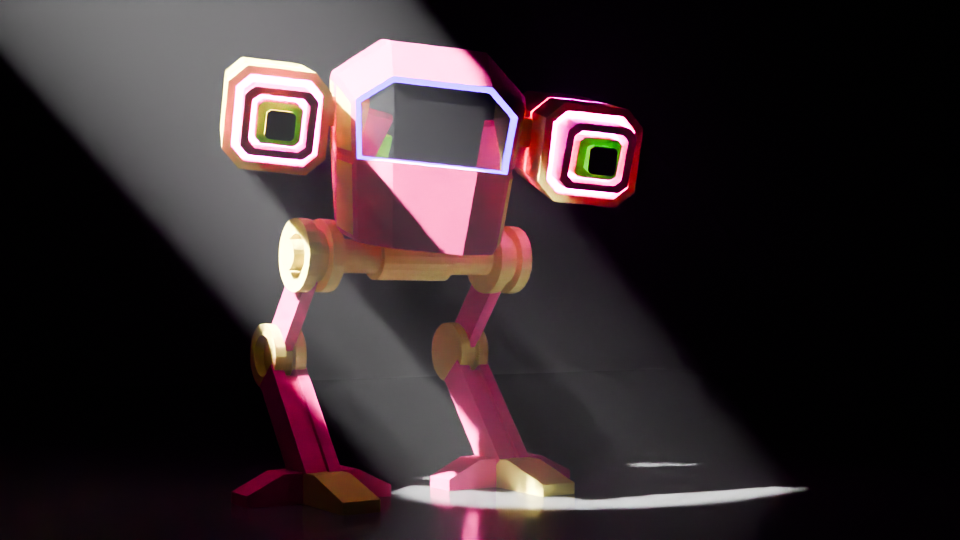
    Completed mech with colouring and glowing guns. The green glow around the windscreen is a classy touch.

    The mech I used had a bit of a different colour scheme, I have dubbed it ‘the fabulous mech’ due to the glittery guns and pink glow around the screen.

    Rigging involves adding bones to the design, linking those bones to the model, and moving the bones instead of moving the mesh of the body. This is just like how Aardman animate their models for stop motion.

    Blender viewport showing a two legged mechanoid with bone rigging.
    The grey shapes are the ‘bones’, they control parts of the Mech model. You can rotate the bones to make the head move and move the bones in the legs to make it walk.

    Moving the bones around using keyframes to control the timing of the mech and stuff. First trial was to have the Mech look around, notice the camera and step towards the camera.

    Mech stepping to the camera. Mean and pink.

    Getting a walk cycle for the thing was a bit fiddly. Moving the legs in a bird-like manner is easy enough, but getting the feet right and stopping them slipping needed a bit of fiddling about. Took me a while, but the result is pretty good. I wrote an Excel spreadsheet to help me with the timings of bone movement and getting the whole thing to move without ‘foot slip’, where the stationary foot moved backwards during the walk cycle.

    It’s a bit gloomy, but the fabulous mech is here to menace you!

    I’ll do some more on this later. The walk is mechanical (well, it would be). The lighting need to be improved so you can see the thing. I will add a swing to the hips and also movement of the head so it looks like the operators are searching for something.

    Stay tuned!

  • Falling cubes, tracking camera

    Falling cubes, tracking camera

    There are a few videos on YouTube (and elsewhere1) of piles cubes being dropped, weights being dropped on cubes and balls hitting piles of cubes. I’ve done one myself, and it’s quite satisfying. Destruction of things without actually wasting resources. I was asked if I was in need of some sort of catharsis. I don’t think so.

    I decided to mix it up a bit and have a series of groups of cubes dropping as the camera tracked past. The varying weights video (above) had a static camera. I rendered the different videos separately and spliced them together before adding sound to give it a bit of realism. The final bit where a flying cube hits the camera was the only camera movement I did. The shaking as the blocks hit the ground was done using an add-on called ‘camera shakify’2.

    Blocks of cubes

    First you make the cubes and then add physics. The easiest way to make a bunch of the same things is using an Array modifier, where you repeat an object a set number of times. So to make an 8 x 8 x 8 cube of cubes, I did three arrays of 8 in the X, Y and Z direction. Then the 1096 block need to be separated and given physics.

    ‘Physics’ in this sense means that the objects react to gravity and to other objects with physics. The video below shows how objects interact with ‘active’ physics, ‘passive’ physics and no physics. So the green cubes react to gravity and are stopped by the red passive objects. Passive objects don’t react to gravity or other forces but get in the way of active objects. The blue ‘no physics’ cube gets ignored.

    Initially I made four blocks of cubes: 2, 5, 8 and the 10-cubed blocks, and then set up the moving camera.

    Camera settings

    To get a camera to pan while it focuses on a moving spot you need two things. A line for the camera to follow and something for the camera to aim at. For this video, the line is a curve that runs mostly straight past the cubes and then curves around and up to finish with a view of all the fallen blocks. The camera is pointing at an ’empty’, which is an object that will not render in the final image. I animated the movement of the empty so that the camera would arrive just as the blocks started to fall.

    The camera itself has several settings, not all of which I understand. The one I do understand is ‘motion blur’, which adds a little realism to the falling blocks. The video below shows the effect in a simple scene. In the final frame of the video below you can see there is blurring of the cubes on the left and the animation looks a bit more realistic.

    Lights!

    Lights above the cubes turn on as the camera arrives. These are circular area lights, intense and powerful. I also added a ‘fog cube’ so the light beam could be seen. More lights, smaller yellow ones, and a back wall add some shape to the studio that all this is happening in. Getting this timed correctly is relatively easy, keyframes for the light intensity can be edited as needed.

    I noticed how high the blocks went for the 10 – cubed block and so I thought I’d see what happens with 12 cubed. And the cubes went everywhere. Drilling down into the narrative3, I thought that the set-up would have overlooked this and so the lights that come on as the camera tracks would be too low for the last pile and this light gets destroyed by the cubes.

    I added a cube above the light, did a cell fracture4 (only 20 pieces) and timed it so that the erupting cubes hit the fractured cubes as the physics takes over and the pieces fly everywhere. It just so happened that the end point of the camera track was just to the right of where one of the pieces flew.

    Video below is how the Blender screen looks as the final animation is playing. There are random colours added to each object so I can make them out. There is a small three-way axis that travels left to right – that’s the empty that the camera (the pyramid that travels along the black curve) is locked in on.

    Sound!

    Getting the sounds was difficult, it is usually the part I struggle with. I have various thumps, crashes and loud clicks saved, so they were easy to get. I wanted to have a director saying ‘action’ and then ‘CUT!” but could I find one? Could I bugger. So in the end I recorded myself as the director. The family don’t think it sounds like me, the microphone I used is a bit heavy on the treble.

    Two weeks after publishing it on YouTube it’s had about 500 views. The simple destruction videos seem to do a lot better than ones with a narrative. So I guess it’s back to explosions.

    1. Such as TikTok. I will post these videos there, see if I get any interest. ↩︎

    2. It shakes the camera. But you probably guessed that. ↩︎
    3. The narrative being that these demos are for real but the director is a bit hurried with his setting up and is under time and budget pressure to get the videos done. ↩︎
    4. I’d done a cell fracture demo, showing how a wall breaks with different levels of cell fracture. It’s had over 20,000 views. I guess people like things being destroyed. ↩︎
  • Pumpkin spice and shape keys

    Pumpkin spice and shape keys

    Thinking about how Hallowe’en is coming up and the fact that pumpkin spice is available in coffee shops. I’d tried to think of a Hallowe’en themed design for the shop, but had no inspiration, despite getting an asset pack from Gamedev.org that is full of creepy stuff.

    What to do? How about a fun animation? I previously did a morph animation where a banana changed into a monster truck and that got quite a few views on YouTube (2704 at the time of blogging). Not as many as the wall smash video (20,629!) but still more than some of the videos I’ve taken more time over, including the cubes and tracked camera (I’ll be blogging that one soon).

    Morphing in Blender can be done in a few ways. For the banana video I got the two models to spin really quickly then had the render stop for the banana and start for the truck while they were spinning at high revs. It looked good. But it felt like cheating. What other option are there?

    Other morphing methods

    For this one I used shape keys. All shapes have vertices, the points where the edges meet. It’s the edges that make the faces and the faces that make the shapes. Most of the time you control where the vertices are by pulling them around or by moving the whole model, but with shape keys you do things a bit differently. You take the first shape and record where all the vertices are. You then add a second shape and record where its vertices are. These are the shape keys. To morph between the two shapes, Blender will move the vertices from shape one to where the vertices are on shape two. And then you control where the vertices are on the shapes

    Changing the value of the shape key changes the shape of the object. You can animate this, so the shape can change when and how you want.

    I did the same sort of thing with the pumpkin and the chili, assigning shape keys to the two extremes. Using the animation feature, the pumpkin is made to shrink in diameter and lengthen, change colour and emerge as a chili.

    The emergence of the chili stalk looked odd (see below), the colour change wasn’t smooth so I fell back to adding a spin to the whole animation to hide the weirdness. Still a bit cheaty, but the growth of the chili is in the animation.

    Text animation

    I uploaded the video to Canva to add the text. For this sort of thing I am happier with Canva at the moment. Though I find the lack of keyframes fiddly, there are some things I can do with text that are a lot easier in Canva than in Blender1. For this, I wanted the words ‘Pumpkin’ to stay above the animation and then the word ‘Spice’ to be animated into the scene when the chili appeared. Once I was happy with that, I downloaded it and went into the Blender video editor again to add sounds.

    Sounds make all the difference

    The first go I had with the sounds didn’t go down well. Younger child gave me her “Eww” face when I played it with a squelchy sound.

    So I changed it to a slightly less organic noise and rendered the whole thing.

    When I went to upload it to YouTube, it was categorised as a normal video, rather than a short. So I re-uploaded it to Canva and created a new YouTube short. That sorted the problem. I even did a video demonstration on how to do it, in case I forget.

    Video on how to use Canva to make a YouTube short out of a video that’s wrong in some way for that format. YouTube won’t tell you what’s wrong with the video, though.

    Finished

    The final video is a nice bit of fun – it makes my youngest laugh, as long as I don’t mention the slurping jelly noise.

    1. There are pre-set animations that are very useful. With Blender the infinite variety can be a bit daunting especially if you have an animation in mind. . ↩︎
  • Wizard’s workshop

    Wizard’s workshop

    I’ve been working on this a bit at a time since early July. It’s another course by Grant Abbitt – his Character Creator course gave us Steve the Orc, whose stand-up career hasn’t really taken off.

    I’d done a dungeon build earlier in the year, with Grant, as part of the course that resulted in the two-legged mech, the dinosaur and Bob the Demon. We built walls and a floor then populated the dungeon with barrels, crates and torches. This project is a super-charged version.

    The wizard’s workshop is an introduction to making scenes in Blender. Working with a 3D modelling system there is no issue of getting perspective wrong, but there is a need to get the proportions right in a scene. Your shelves and furniture, books, candles and other oddments need to be the correct size otherwise the scene won’t work.

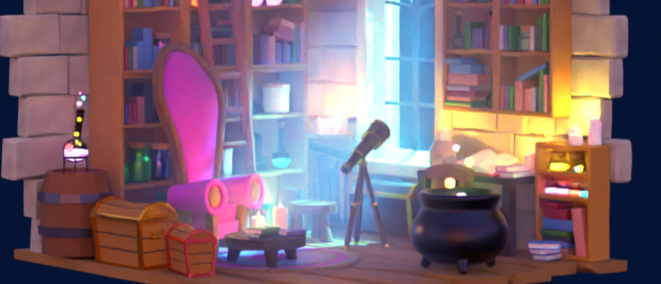
    Finished workshop with comfy chair, lots of books, bubbling cauldron, mysterious liquids and a pet skull on the reading table.

    I learned quite a few useful things during the course. Modelling glass and filling it with different coloured liquids, how to randomly assign colours to similar things (the books), and creating an atmosphere in a room using mist and moonlight.

    Away from the bright colours of the final render there’s a lot of fiddly bits that will allow me to move stuff around if I get the urge. Each group of books is linked to a single ’empty’ so I can move and position several books at a time. It’s how I got the pile of books next to the cauldron. I could also animate flying books or potion bottles – it’s a wizard’s room, after all!

    Random colours for each item help to see what items are where without the computer lag associated with full render. You can also see a lot of little arrows – those help move and align multiple items

    So finally I did an animation where the camera goes round in a circle while focussing on one item. This helps you to see more of the items in the scene.

  • Duo at 2600

    Duo at 2600

    It’s now over seven years since I started my Duolingo steak. Today I hit 2600 days!

    I’ve concentrated on German for the last few years, partly to help our youngest with her German and also as a good intellectual exercise. I’ve also done quite a bit of Danish (hvorfor har du ikke bukser på?) and tried Scots Gaelic, though I struggled a lot with that.

    Am I fluent? No. Can I ask for things in German? Probably. I still struggle with grammar, especially declension, which is usually a guess. I mean, why do they need so many words for ‘the’? How does such a thing even come about? That’s a linguistics question and there’s no Duolingo for that.

Verified by MonsterInsights